Dejavoo
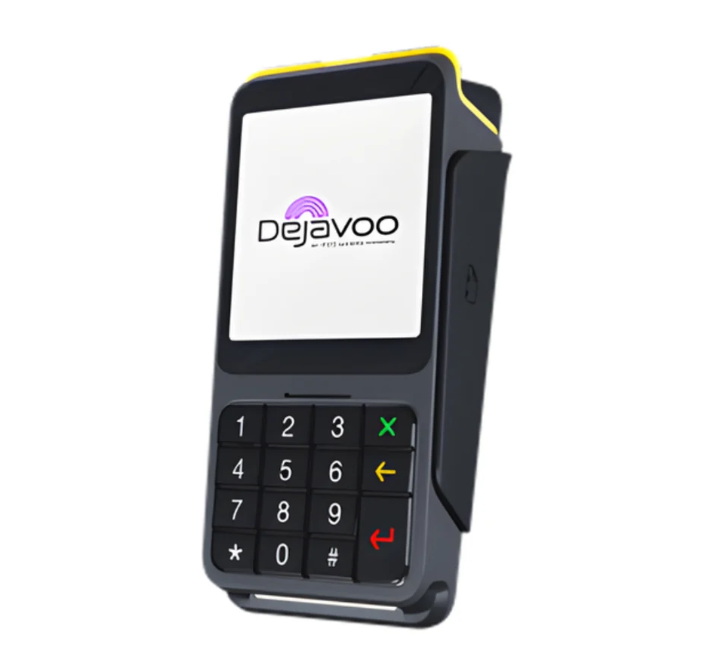
Dejavoo P17 PIN Pad
Put payment in your customer’s hands
A customer-facing Android PIN pad with a 4-inch touchscreen, tactile keypad, built-in privacy shielding, and chip, contactless, and swipe payments. Designed for compatible payment and POS systems.
- Listed price
- Call for Pricing
- Best for
- Retail, restaurant, healthcare, and professional office checkout
- Category
- Customer-facing PIN pad
Listed pricing may exclude taxes, shipping, accessories, software, processing, installation, and other program costs. Confirm current availability and terms before ordering.
Dejavoo P17 PIN Pad features
The P17 brings payment acceptance to retail counters, restaurants, healthcare practices, pharmacies, and professional offices. Android 11, signature capture, and dual-pricing display capability support customer-facing checkout, with USB-C, Wi-Fi, and Bluetooth connectivity. Confirm POS integration and processing configuration with PartnerSwipe before ordering.
- Android 11 operating system
- 4-inch HD IPS touchscreen with 480 × 480 resolution
- Tactile physical keypad
- Built-in privacy shielding
- EMV chip, contactless, and magnetic-stripe payments
- Dual-pricing display capability
- USB Type-C connectivity
- 2.4 GHz Wi-Fi
- Bluetooth 4.0
- Signature capture
- Built-in speaker and audio jack
- Three Mini SAM card slots
- 1.3 GHz quad-core Cortex-A7 processor
- 1 GB RAM and 16 GB storage; optional 2 GB RAM
Before you choose
Confirm the complete setup, not only the device.
PartnerSwipe can review the operational and processing details that determine whether this equipment fits.
Confirm compatibility
Verify your processor, software, integrations, connectivity, and required accessories before ordering.
Review the full cost
Confirm current hardware, shipping, taxes, software, processing, installation, and promotion terms.
Plan the rollout
Discuss configuration, staff training, activation, support, and replacement coverage for your setup.
Find out what your processing is really costing you.
Get a review of your rates, equipment, and options with no obligation.